
How Do I Apply for My Massachusetts Insurance License?
Ready to level up your insurance game? Get the expert guidance and resources you need to go pro.
Quick Answers:
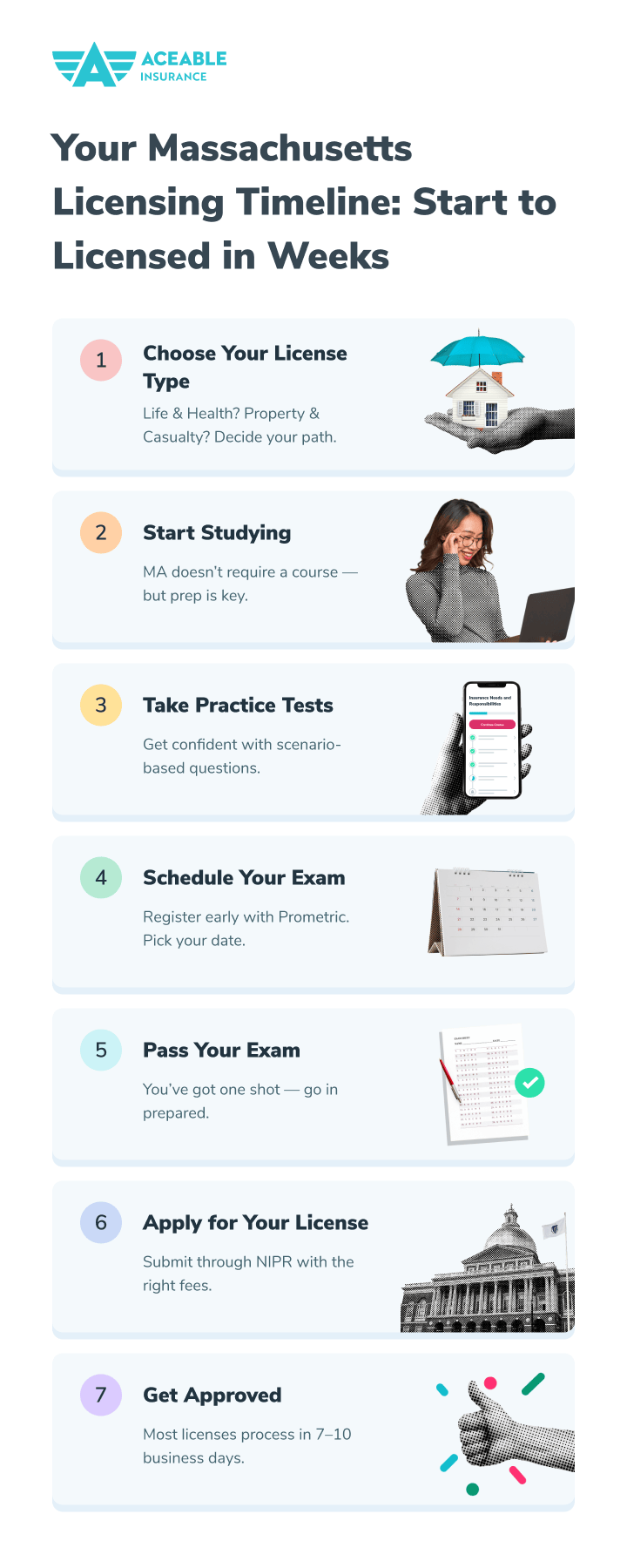
- Apply through NIPR after passing your licensing exam - applications typically process in 7-10 business days
- Total fees: $225 base application fee plus $75 lead paint surcharge for Property/Casualty/Personal Lines
- You'll need your exam results, government ID information, and background disclosure details
You've studied hard, passed your Massachusetts insurance licensing exam, and now you're ready for the final step: applying for your official license. The application process is straightforward when you understand requirements, but small mistakes can cause frustrating delays. This complete guide walks you through every step from exam completion to receiving your active license.
Understanding the Massachusetts Licensing System
Massachusetts transitioned to the National Association of Insurance Commissioners' State Based Systems (SBS) for insurance licensing. This means you'll apply through the National Insurance Producer Registry (NIPR), which streamlines the process and integrates with the Massachusetts Division of Insurance systems.
Key Benefits of This System:
- Single online application for Massachusetts licensure
- Immediate payment processing via credit card or electronic check
- Real-time application status tracking
- Electronic license delivery (no waiting for mail)
- Integration with continuing education tracking
- Simplified renewal process in future years
Understanding this system helps you navigate the application efficiently and avoid common pitfalls that delay processing.
Timing Your Application Strategically
After passing your Massachusetts insurance exam, strategic timing optimizes your licensing timeline:
Mandatory Waiting Period:
You must wait 24 hours after passing your exam before applying for your license. This delay allows Prometric to electronically transmit your exam results to the Massachusetts Division of Insurance. Attempting to apply earlier results in error messages or application rejection.
Optimal Application Window:
The best time to submit your application is 24-48 hours after passing your exam:
- Your exam results have processed in state systems
- Course material remains fresh if questions arise
- You maintain momentum toward career launch
- Processing begins immediately rather than being delayed
Avoid These Timing Mistakes:
- Waiting weeks or months after passing (exam results eventually expire)
- Applying immediately after exam before results process
- Starting application but not completing it promptly
- Submitting during state holidays when processing staff are off
Required Information and Documents
Before starting your application, gather all necessary information to avoid stopping mid-process:
Personal Information Needed:
Identity Details:
- Full legal name (must match government ID exactly)
- Social Security Number
- Date of birth
- Residential address (P.O. boxes not accepted)
- Mailing address (if different from residential)
- Valid email address for license delivery and communications
- Phone number for state contact if needed
Important: Your name must match your government-issued ID exactly, including middle names, suffixes (Jr., Sr., III), and spelling. Discrepancies cause processing delays.
License-Specific Information:
Line(s) of Authority:
Indicate which license types you're applying for based on passed exams:
- Property
- Casualty
- Personal Lines (requires existing Property & Casualty license)
- Life
- Accident & Health
- Variable Products (requires FINRA registration)
Exam Information:
- Date you passed exam(s)
- Exam code numbers
- Testing location (automatically provided by Prometric)
Background Disclosure Information:
Massachusetts requires honest disclosure about:
Criminal History:
- Any felony convictions
- Misdemeanor convictions involving dishonesty or breach of trust
- Pending criminal charges
- Expunged or sealed records (check specific state requirements)
Financial History:
- Bankruptcy filings within past 10 years
- Outstanding tax liens or judgments
- Child support payment delinquencies
Professional History:
- Previous insurance license denials, suspensions, or revocations
- Disciplinary actions by insurance departments
- Professional license issues in any industry
Important: Answering "yes" to background questions doesn't automatically disqualify you, but requires submitting supporting documentation explaining circumstances. Dishonest answers DO result in application denial and possible permanent licensing ineligibility.
Military and Special Status:
If applicable, prepare documentation for:
Veterans:
- DD-214 form for application fee exemption
- Must be Massachusetts resident
- Upload through NIPR Attachment Warehouse
Legal Blindness:
- Medical documentation verifying legal blindness
- Qualifies for fee exemption
- Submit through NIPR Attachment Warehouse
Step-by-Step Application Process
Now that you've gathered required information, follow these steps for successful application submission:
Step 1: Access the NIPR Application System
- Navigate to NIPR's LicenseHub
- Click "Apply for a license" from the menu
- Select "Resident" as your license type
- Choose "Individual" as applicant type
- Click "Continue" to begin your application
Step 2: Create Your NIPR Account (If New User)
First-time NIPR users must create an account:
- Provide your full legal name
- Enter valid email address
- Create secure password
- Verify email through confirmation link
- Log in with new credentials
Returning users: Simply log in with existing NIPR credentials.
Step 3: Select Massachusetts License Application
From your NIPR dashboard:
- Choose "Massachusetts" from state dropdown menu
- Select "Resident Individual Producer License"
- Review application requirements summary
- Click "Start Application" to begin
Step 4: Complete Personal Information Section
Enter all personal details carefully:
- Legal name exactly as appears on government ID
- Social Security Number (triple-check accuracy)
- Date of birth
- Current residential address
- Mailing address if different
- Contact information
Pro tip: Complete this section when you have 15-20 uninterrupted minutes. The system times out after inactivity, and you'll need to restart.
Step 5: Select Lines of Authority
Indicate which license types you're requesting:
- Check boxes for all lines you passed exams for
- You can select multiple lines if you passed multiple exams
- Fees calculate automatically based on selections
- Don't request lines you didn't test for (causes delays)
Step 6: Answer Background Questions
Massachusetts asks standard NAIC uniform background questions:
- Criminal history disclosures
- Financial background information
- Professional disciplinary history
- Other regulatory actions
Critical: Answer honestly and completely
If you answer "yes" to any question:
- Detailed explanation fields appear
- You'll need to upload supporting documentation
- Provide context and resolution information
- Show rehabilitation or corrective actions taken
False answers discovered later result in license revocation and potential permanent industry ban.
Step 7: Upload Required Documentation
If needed based on your circumstances:
Required uploads through NIPR Attachment Warehouse:
- DD-214 (veterans claiming fee exemption)
- Legal blindness documentation (claiming fee exemption)
- Background explanation documents (if answered "yes" to disclosures)
- Court documents, settlement agreements, or character references
Upload tips:
- Use clear, readable scans or photos
- PDF format preferred for documents
- File sizes typically limited to 10MB
- Label files clearly (e.g., "DD214_LastName.pdf")
Step 8: Review Application Thoroughly
Before submitting, carefully review every section:
- Verify all names spelled correctly
- Confirm Social Security Number accuracy
- Check address formatting
- Ensure all required fields completed
- Review background disclosures for accuracy
- Verify selected lines of authority match passed exams
Take your time on this step. Most application delays stem from errors discovered here.
Step 9: Calculate and Pay Application Fees
Massachusetts insurance license fees are straightforward but vary by license type:
Base Application Fee: $225
- Covers standard license processing
- Required for all individual producer licenses
- Non-refundable once submitted
Additional Fees:
- Lead Paint Surcharge: $75 (required for Property, Casualty, or Personal Lines)
- Total for P&C agents: $300 ($225 + $75)
- Total for Life & Health only: $225
- Total for all lines: $300 (surcharge only applies once regardless of number of lines)
Payment Methods Accepted:
- Major credit cards (Visa, Mastercard, American Express, Discover)
- Debit cards with credit processing capability
- Electronic check (ACH) from checking account
- Some corporate/business credit cards
Payment Processing:
- Charges process immediately upon submission
- Confirmation email sent to your registered email
- Save payment receipt for records
- Some employers reimburse licensing fees
Step 10: Submit Application
After reviewing everything and completing payment:
- Click "Submit Application" button
- Receive immediate confirmation number
- Get confirmation email with application details
- Access application status tracker
Save your confirmation number! You'll need it to check application status and for any correspondence with the state.
Ready to take your insurance career to the next level?
If you’re eager to learn how to not only get licensed but also thrive in your insurance career, check out our Tips for Becoming a Successful Insurance Agent.
After Submission: What Happens Next
Once you submit your complete application, here's the typical processing timeline:
Immediate Processing (Day 1):
- NIPR transmits your application to Massachusetts Division of Insurance electronically
- Payment processes and confirms
- Application enters state review queue
- You receive email confirming receipt
State Review Period (Days 2-7):
According to NIPR, states typically take 7-10 business days to review complete applications. During this time, Massachusetts staff:
- Verify exam results match your application
- Confirm all required information provided
- Review background disclosures if applicable
- Process payment and generate license record
- Conduct any necessary additional verification
Potential Delays:
Some applications take longer than average due to:
Background Review:
- "Yes" answers to background questions require additional time
- Supporting documentation must be reviewed by licensing staff
- Complex situations may need supervisor or legal review
- Can add 1-3 weeks to processing time
Missing Information:
- Incomplete sections trigger requests for additional info
- State emails you requesting missing details
- Processing pauses until you respond
- Quick responses (24-48 hours) minimize delays
Name or ID Discrepancies:
- Name on application not matching exam records
- Social Security Number errors or mismatches
- Address verification issues
- Require correction and resubmission
Technical Issues:
- System problems occasionally delay processing
- Payment processing failures need resolution
- Electronic transmission errors between systems
License Approval and Delivery:
When Massachusetts approves your license:
- You receive email notification of approval
- License becomes active immediately
- Electronic license available for download
- License information appears in public database
- You can print official license copy
Accessing Your License:
- Log into Massachusetts SBS system
- Enter your license number or National Producer Number
- View your active license status
- Download PDF copy of official license
- Print for your records
Your license will show:
- Your full legal name
- National Producer Number (NPN)
- License number
- Lines of authority
- Issue date
- Expiration date (3 years from issue)
- License status (Active)
Checking Your Application Status
You don't need to wait blindly for approval. Track your application progress:
Through NIPR:
- Log into your NIPR LicenseHub account
- Click "Application Status" or "Order History"
- Enter your confirmation number or locate your Massachusetts application
- View current processing status
- See if any action needed from you
Through Massachusetts SBS:
- Visit Massachusetts license lookup
- Enter your identifying information
- Check if license appears as approved
- Verify all lines of authority are correct
Status Updates Mean:
- "Submitted" - Received by state, not yet reviewed
- "In Process" - Under active review by state staff
- "Additional Information Needed" - You must respond to state request
- "Approved" - License issued and active
- "Pending" - Waiting for supporting documentation or clarification
If your application shows "Additional Information Needed," check your email immediately and respond to state requests within 24-48 hours to avoid extended delays.
Troubleshooting Common Application Problems
Even careful applicants sometimes encounter issues. Here's how to resolve common problems:
Problem: Application Won't Submit
Possible causes:
- Required fields incomplete
- Name format not matching system requirements
- Browser compatibility issues
- Session timeout from inactivity
Solutions:
- Review every section for missing information
- Ensure name exactly matches government ID
- Try different browser (Chrome works best)
- Save frequently and work in shorter sessions
Problem: Exam Results Not Found
Possible causes:
- Applied before 24-hour waiting period elapsed
- Name on exam different from application name
- Exam results not yet transmitted to state
- Testing under different name variant
Solutions:
- Wait full 24 hours after exam before applying
- Verify name exactly matches exam registration
- Contact Prometric to confirm result transmission
- Contact Massachusetts Division of Insurance if persistent
Problem: Payment Declined
Possible causes:
- Insufficient funds or credit limit
- Card expired or invalid
- Billing address doesn't match card
- Bank blocking transaction as potential fraud
Solutions:
- Verify card has sufficient available credit
- Check card expiration date
- Ensure billing address matches card statement
- Call bank to authorize transaction
- Try alternate payment method
Problem: Background Question Issues
Possible causes:
- Unclear how to answer specific situations
- Missing required supporting documentation
- Explanation field character limits
- Uncertainty about disclosure requirements
Solutions:
- Contact Massachusetts Division of Insurance at (617) 521-7794
- Email producerupdate.mailbox@mass.gov with specific questions
- Provide detailed explanations showing resolution
- Include all relevant supporting documents
Problem: Extended Processing Time
Possible causes:
- Background review taking longer than average
- High application volume during busy seasons
- Additional verification needed
- System or staffing issues at state level
Solutions:
- Check status regularly through NIPR and SBS
- Respond immediately to any state requests
- Call Massachusetts licensing unit at (617) 521-7794, option 3
- Be patient but proactive after 10 business days
Special Situations and Considerations
Some applicants face unique circumstances requiring special handling:
Applying for Multiple Lines:
If you passed exams for multiple lines of authority:
- You can request all lines on single application
- Fees don't increase for additional lines (except single $75 surcharge for any P&C lines)
- All lines issue simultaneously on one license
- More efficient than submitting separate applications
Adding Lines Later:
If you want to add lines of authority after initial licensing:
- You must pass required exam(s) first
- Submit amendment application through NIPR
- Pay applicable fees for new lines
- Wait for approval before selling new products
Non-Resident Applications:
If you're licensed in another state and want Massachusetts non-resident status:
- Must hold active resident license in your home state
- Apply through NIPR as non-resident
- Fees typically same as resident license
- Reciprocity may streamline requirements
Business Entity Licenses:
If you're applying for an agency/business license instead of individual:
- Different application process applies
- Must first obtain name approval from Commissioner
- Submit member list with individual license numbers
- Pay $75 per member listed on license
- More complex process than individual licensing
Transitioning from Non-Resident to Resident:
If you move to Massachusetts while holding non-resident license:
- You have 90 days to update to resident status
- Don't need to retake Massachusetts exams
- Submit status change through NIPR
- Provide proof of Massachusetts residency
After License Approval: Immediate Next Steps
Receiving your Massachusetts insurance license is exciting, but your work isn't done:
Print and Save Your License:
- Download PDF copy immediately
- Print several copies for your records
- Save digital copy in multiple locations
- Some employers require submitting copy
Obtain Carrier Appointments:
Before you can legally sell insurance products, you need appointments:
- Captive agents: Employer handles appointment process
- Independent agents: Apply to multiple carriers individually
- Appointment requirements: Active Massachusetts license, application, background check
- Processing time: 1-3 weeks typically per carrier
Understand Your Continuing Education Requirements:
Massachusetts requires ongoing education to maintain your license:
- First renewal (3 years): 60 hours including 3 hours ethics
- Subsequent renewals: 45 hours every 3 years including 3 hours ethics
- Track your progress: Massachusetts reports through SBS system
- Plan ahead: Don't wait until renewal deadline approaches
Learn about Massachusetts CE requirements so you stay compliant from day one.
Begin Your Insurance Career:
With active license and carrier appointments:
- Start building your client base
- Develop prospecting and marketing strategies
- Build relationships with mentors and experienced agents
- Focus on providing excellent client service
- Continue learning about products and industry
License Maintenance and Renewal
Your Massachusetts insurance license requires active maintenance:
License Renewal Cycle:
- Initial license term: 3 years from issue date
- Renewal date: Last day of your birth month every 3 years
- Must complete required CE before renewal deadline
- Renewal applications open 90 days before expiration
Renewal Process:
- Renew through NIPR online system
- Pay renewal fees ($225 plus $75 surcharge if applicable)
- Confirm CE completion with state
- Update any changed information
- Print new license after approval
Maintaining Active Status:
- Keep personal information current with state
- Report address changes within 30 days
- Maintain carrier appointments
- Complete required CE on time
- Avoid actions that could trigger discipline
Getting Help When You Need It
If you encounter problems during the application process:
Massachusetts Division of Insurance:
Producer Licensing Unit:
- Phone: (617) 521-7794, option 3
- Email: producerupdate.mailbox@mass.gov
- Hours: Monday-Friday, 8:45 AM - 5:00 PM ET
- Address: 1000 Washington Street, Suite #810, Boston, MA 02118
NIPR Customer Support:
- Phone: (816) 783-8500
- Hours: Monday-Friday, 7:00 AM - 6:00 PM CT
- Email: Available through LicenseHub help section
- Online: Help articles at nipr.com
Your Course Provider:
If you completed pre-licensing education:
- Contact student support for exam/license questions
- Many providers offer licensing assistance
- Can help troubleshoot common application issues
Start Your Licensed Insurance Career Today
Applying for your Massachusetts insurance license is the final administrative step between you and your new career. The process is straightforward when you understand requirements, gather information in advance, and submit a complete, accurate application.
You've come this far - you studied hard, passed your exam, and now you're ready to help Massachusetts families and businesses protect what matters most to them. Don't let small application mistakes delay your career launch.
Ready to get started?
Your future in the insurance industry starts now.